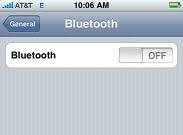

Bluetooth is the facility which allows you to connect and sync wirelessly with other hardware and transfer data with no such limit. In smart phones, Bluetooth is a common used connectivity giving users to interact and share amount of data easily to each other. You can keep it turned on or off as your requirement. It automatically detects other available hardware in its range, but needs permission of other user for being able to connect. If you do not use this facility much often, you should turn it off in order to avoid battery consumption. Here is the guide which will tell you that how to turn it in on or off.
- At first you will tap on settings from iPhone or any iOS device and then tap on general.
- Here you will see Bluetooth option, tap on it to open. Now you can tap on on/off button. Close the settings and it will be done.
You do not always turn it on unless you want to transfer or share data from one hardware to another, so better to keep it off. If you are using Bluetooth keyboard, then you have to turn it on all the time.